Dead Game Shenanigans
Published: 2026-04-15
Introduction
For those who know me, you’d know that I am (was?) a massive fan of Paladins: Champions of the Realm . Now, for the longest time, I’ve always wanted to build some kind of app to track player information: whether it is a website (like Paladins Guru ), or some kind of Discord bot (such as PaladinsAssistant ).
The main motivation for this was that there were things about both Paladins Guru and PaladinsAssistant that I was dissatisfied about. For example, with Paladins Guru, it is more useful as a tool to keep track of match history; there is little information about players that’s provided, outside of very basic (outdated) statistics.
On the other hand, while PaladinsAssistant provides good information on the player, there were still certain pieces of information that it lacked. Namely, there is no way to check a user’s friends list (despite this being information relayed by the API), and it is marred by a variety of bugs and errors and minor inconveniences (such as incorrect stats calculations, needing to specify the platform for console player, etc.).
However, there was just one issue… a very big one at that: they stopped handing out API keys years ago. Needless to say, I was devastated… After all, does this mean I am stuck having to use these tools for the rest of the game’s lifespan?
Well, in this blog, I will be documenting my journey in trying to create a stalking information-gathering app in a dead game.
Locked Outside
In this first section, I’ll be talking about the initial ideas I had to try and circumvent the lack of having an API key. Namely, I decided to attack the problem by webscraping.
BeautifulSoup
My initial idea was to write a website scraper in order to gather information about players from Paladins Guru . This can be done in Python using BeautifulSoup. Thus began my initial attempts at trying to create the perfect stalking app.
To this end, I first wrote up a simple function find_player() that returns the URL linking us to the player.
To figure out where the link was actually buried at, I first searched for a player, noticing that the URL is of the form https://paladins.guru/search?term={Username}&type=Player. From here, I inspected the HTMl and found that the address pointing to the player is buried in a link with the class class="player-widget__a".
So, the steps are simple:
- First, we search up the player.
- Then, using
BeautifulSoup, we can parse the HTML and find where the profile link is, returning that.
import requests
from bs4 import BeautifulSoup

BASE = "https://paladins.guru"

session = requests.Session()
session.headers.update({
    "User-Agent": "Mozilla/5.0"
})

def find_player_profile(username):
    url = f"{BASE}/search?term={username}&type=Player"
    res = session.get(url)

    soup = BeautifulSoup(res.text, "html.parser")
    link = soup.find("a", class_="player-widget__a")
    return BASE + link["href"]

print(find_player_profile("Username"))
Except, this didn’t go as planned. Instead of returning the URL as expected, I ran into an error: soup.find() was returning None. The reason? Cloudflare.
Okay, great, I guess that idea died in like one minute.
Playwright
The next idea I had was to instead try using playwright, a browser automation tool, in order to simulate actually going onto the website. Alright, let’s try this again, but this time with playwright:
def find_player(username):
    with sync_playwright() as p:
        browser = p.chromium.launch(headless=True)
        page = browser.new_page()

        url = f"https://paladins.guru/search?term={username}&type=Player"
        page.goto(url)

        page.wait_for_timeout(5000)

        link = page.locator("a.player-widget__a").first
        href = link.get_attribute("href")
        player_link = f"{BASE}{href}"

        browser.close()

        return player_link
Lo and behold, it worked. I successfully extracted the player_link. With this working, this means that we can now start actually going to the player pages, inspecting their matches, and scrape information on them. Perfect. This means that we now can extract detailed information about matches — something that PaladinsAssitant lacks — and them perhaps combine it with information scraped from PaladinsAssistant’s messages, combining the best of both worlds.
Issues
Unfortunately, there were a few glaring issues with this approach that were out of my control. One issue is that the website frequently experiences hiccups and goes down; this meant that reliability was heavily reliant on whether Paladins Guru was up or not. Needless to say, this was a disaster.
Another issue was that it takes quite a while to actually fetch the information: just fetching the player’s URL took on average seconds, averaged over iterations. That’s… pretty slow just for fetching the match history page.
As such, ultimately, it became very apparent very quickly that while I could scrape the website for information, it would be too slow for actual usage by multiple people. As such, this was method was relegated to just a thought experiment and nothing more.
Another concern was that I was ultimately limited to the information I could get from PaladinsGuru and PaladinsAssistant. Although I could combine the two to get the best of both worlds, ultimately, it would still be lacking some crucical information I was interested in (e.g. a player’s friends list).
Breakthrough
Let us skip forward a couple of months. At this point in time, hopes of creating a competitor for Paladins Guru and PaladinsAssistant was all but gone; there was nothing I could do without an API key…
Or at least, that’s what I thought. However, through some miraculous stroke of luck and a bit of social engineering (making friends), I was able to obtain an API key. This was the breakthrough I needed.
With the API key and documentation in hand, my endeavours in creating the best Paladins tracker could finally start.
Pre-Gaming
Design
With an API key in hand, it’s time to begin actually working on our own Paladins bot. First, there are a few key features that aren’t present in other bots that highly motivates me to embark on this journey:
- Firstly, while bots such as Itto Bot and Pal-Bot displays a user’s friends list, they don’t track “changes” in these lists; this is a key feature I want to implement.
- Secondly, thanks to Pal-Bot, we see that information retrieved from matches includes a user’s Steam ID; being able to map Steam IDs (and maybe even other platforms’) to their corresponding players is another core feature that’d be nice to have.
- Finally, Paladins offers the ability to change your username. Needless to say, keeping track of who’s who can be a bit of a headache. To resolve this, being able to keep track of a player’s previously used usernames would be incredibly useful.
To this end, we note that in order to implement the first feature, we would have to store information on our users somewhere. If we don’t do this, there is no way to compare two states of a player’s friends list to figure out the changes in them.
Similarly, after further interactions wih the API, certain informations such as a user’s Steam ID is only sent when fetching match data. Normally, this wouldn’t be an issue, but a player’s match history is only kept for 30 days; if someone stops playing for a month, we can’t fetch their Steam ID anymore. As such, storing the Steam ID as soon as possible is imperative.
And naturally, in order to keep track of a user’s previous usernames, a database would be a useful tool for bookkeeping these changes.
All of these points lead us to needing a database to store player information. For this, we will be utilizing MongoDB. The basic structure of the database will be as follows in order to implement the three functions outlined earlier:
- First, we will have a collection
PlayersDBwhich stores general information on the player. - Second, we will have a collection
SocialsDBwhich stores the socials lists associated with each player (friends/blocked/outgoing requests), alongside tracking changes in these lists.
We note that since a player’s socials and deltas lists’ growth is unbounded, it’s better to split up into two collections. Referencing them will be done via the player’s ID, which is unique to each account.
Exploring the API
For the initial implementation, we utilized the Pyrez API wrapper . Before we actually start coding up the bot, it’s perhaps useful to toy around with the API and see what information we can retrieve. For example, when calling the getPlayer() method, we get the following entry:
{
  "ActivePlayerId": ...,
  ...
  "Created_Datetime": ...,
  "Last_Login_Datetime": ...,
  ...
  "Name": ...,
  "Platform": ...,
  ...
  "Region": ...,
  ...
  "hz_player_name": ...,
}
Perhaps somewhat confusingly, Name refers to the username associated with the player’s platform account (for example, a player’s Steam username if they’re on Steam), whereas hz_player_name is the actual in-game username tied to a player. Furthermore, Region indicates the region that the player selected to queue in, not where the account is from.
Meanwhile, by providing getMatch() with a valid match ID, we get information on how a match went, which is returned in the form of an array of dictionaries representing each player in the match. Of particular interest to us for now, however, is the following two fields:
[{
  ...
  "playerPortalId": "5",
  "playerPortalUserId": ...,
  ...
},
...
{
    ...
}]
We note that Pyrez has a mapping between playerPortalId (which is an int) and the corresponding platform:
| Number | Platform |
|---|---|
| 1 | Hirez |
| 5 | Steam |
| 9 | PS4 |
| 10 | Xbox |
| 22 | Switch |
| 28 | Epic Games |
| -1 | Unknown |
And even more importantly, it fetches us the user’s playerPortalUserId; this allows us to find the the associated account tied to a user. As we’ve hinted at before, this means that in order for us to map a player’s Platform ID to them, we will have to first retrieve a (non-malformed) match from their history. However, it’ important to note that, for some reason, playerPortalUserId only returns an accurate ID for Steam accounts.
We can also fetch a player’s match history using getMatchHistory(). This yields us an array of dictionaries, each of which representing a match within the last 30 days. Some fields of particular interest being shown below. The most important part is that for each entry in this list, we can index into the dictionary’s Match key to get the match ID, which then allows us to ultimately retrieve the playerPortalUserId:
[{
  ...
  "Map_Game": ...,
  "Match": ...,
  ...
  "Queue": ...,
  "Region": ...,
  ...
  "playerId": ...,
  "playerName": ...,
  ...
},
...
{
    ...
}]
Finally, the last API call that’s of particular interest to us is the getFriends() call. When looking through this, we note that each player has a friend_flag field that specifies what “type of friend” they are in the player’s socials list:
| Flag | Meaning |
|---|---|
| 1 | Friend |
| 2 | Outgoing |
| 32 | Blocked |
Basic Implementation
Now, with all of our planning and exploration in mind, we can begin implementing a barebones Discord bot to stalk check other players’ statistics! For now, we will implement the following functions:
stats(): This will return general statistics about a user.socials(): This will return a player’s socials list (friends/outgoing/blocked). We can pass in a flag to specify which list we want.changes(): This will return changes in a player’s socials list. Once again, we can pass in a flag to specify which list to return.current(): This will return the player’s current status: offline, in lobby, or in a match.
stats()
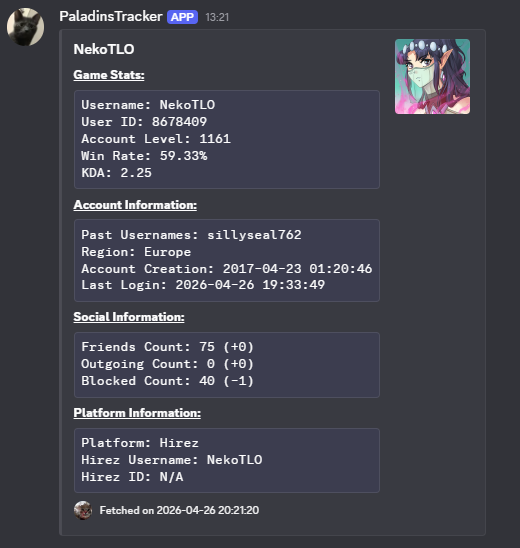
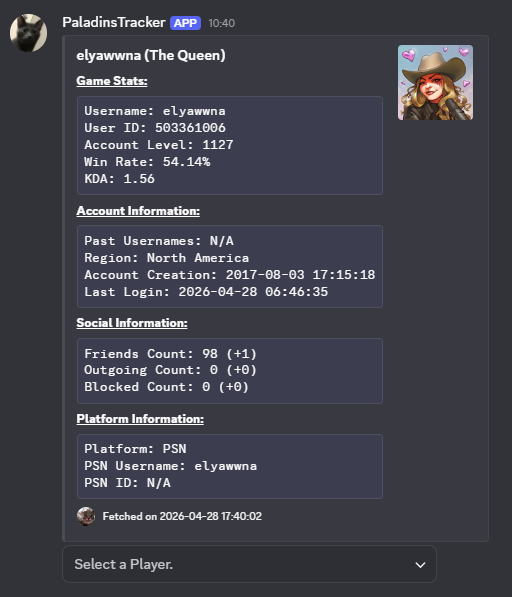
To begin with, we implement stats(), which returns a basic overview of player information. Some key information that I wanted to display includes:
- Username
- User ID
- Past Usernames
- In-game Statistics (Winrate, KDA, Level, etc.)
- Platform
- Platform ID (if available)
- Socials List Length (and deltas) — we will discuss this in the
changes()subsection.
General Game Statistics
To begin with, a lot of these bits of information can be obtained using getPlayer(), which returns us a Player object. From here, we just have to extract the information we need; this is pretty straightforward, and ultimately will give us the same features that other bots like PaladinsAssistant has.
One of the slightly more involved statistics is a player’s KDA, which isn’t explicitly returned by the API. To actually calculate this, we call getChampionRanks(), which returns us all of the champion stats for a player. Then, from here, we iterate through it, summing up the kills, assists, and deaths. Once this is done, we use the following formula to calculuate their KDA, where are our total kills, deaths, and assists respectively:
We note that it’s important to do max(d, 1) in order to avoid a division-by-zero situation if a player hasn’t died yet! Similarly, for our winrate, for being total wins and losses respectively, we do:
Retrieving the Steam ID
Now, as mentioned previously, one of the key things we wanted out of this bot was being able to track someone’s Steam ID (and eventually other platforms too, but that’s for the future). To do this, we proceed as follows:
- First, we search up in our database to see if an entry exists for this player. This entry will also be used to compare changes from our database for other functions later on as well!
- If an entry doesn’t exist, we know immediately to try and find their Steam ID.
- Otherwise, if it does exist, we now check first if their platform is Steam and if we’ve already found their Steam ID.
- Now, if the platform is Steam but their ID is still “N/A”, we know then that we have to try iterating through their match history and retrieve their ID.
- From here, we call
getMatchHistory()with theActivePlayerIdto get the associated player’s match history, iterating through it until we find a match where their entry isn’t malformed. - With this match, we can simply extract their
playerPortalUserId, and store this in our entry we’ll add to our dictionary. Then, we break out of the loop in order to cut down on unneeded iterations!
Storing Past Usernames
Another feature we wanted out of this bot is to keep track of a player’s previously used usernames. This one is honestly a lot more straightforward. Namely, we first have a field aliases for our entries in PlayersDB. Then, from here, we have two situations:
- Firstly, if we haven’t had an entry for this player in
PlayersDByet, we can initializealiasesto be a length-1 array with their current username. - Otherwise, if an entry exists, we check to see if their username is in
aliases; if not, we append our current username to the list. This means that aliases contains all of their usernames, withaliases[:-1]being their previous names, andaliases[-1]being their current one.
socials()
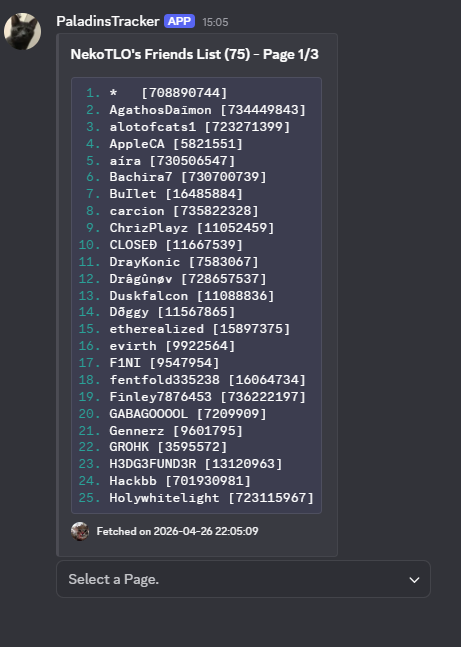
Something else we wanted that was missing from PaladinsAssistant was a socials list feature, allowing us to view someone’s friends/outgoing/block lists. To implement this, we utilized the getFriends() API call, iterating through the result and appending each player to the appropriate list based on their friend_flag.
Paging
Because a socials list can contain hundreds of users, just displaying everyone in one single message could hit the maximum message length for Discord. Because of this, we have to implement a paging feature.
This is done by first “chunking” up our list of players, mapping the chunk number to a list of players in said chunk. By default, we set chunk_size = 25.
From here, we implement a View class that contains a dropdown menu, allowing us to navigate to the page we want. For the actual dropdown, it simply maps the option to the corresponding page, setting our chunk index appropriately. Note that we use a dropdown menu rather than just arrows to navigate as, given the size of some players’ socials list, there could be dozens of pages to sift through.
Discord Limitations
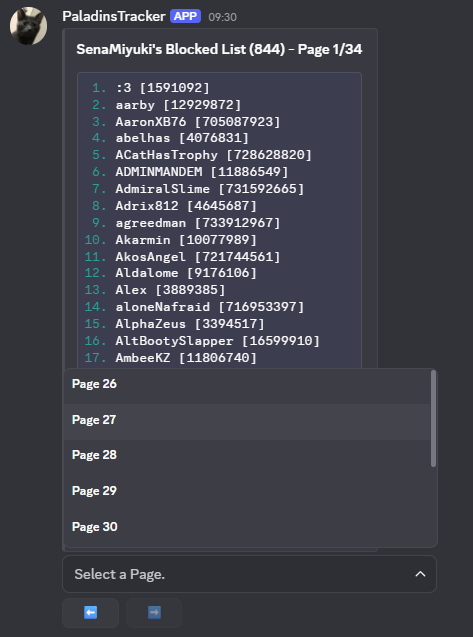
An edge case that wasn’t anticipated at all was the fact that Discord actually has a limit on how many dropdown options you can have (specifically, it’s capped out at 25). Now, unfortunately, some people have socials lists way more than people.
Our workaround for this was to add in an extra set of buttons that allows us to switch between the chunk of dropdown entries. This works by keeping track of our dropdown chunk index, changing it appropriately when an arrow is pressed.
changes()
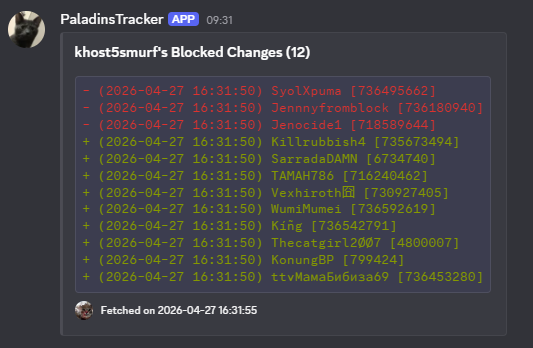
Alongside displaying a user’s socials list, being able to keep track of changes in them is another key feature missing from competing bots. The key idea then is that we can use lists to store the changes, and timestamps to determine what changes occurred since the last stats() call.
More concretely, in our player entry, we have a field Accessed that keeps track of when we last accessed the player information. This will be used to filter operations to only those since the last fetch.
Then, to actually figure out what changes have been made, we recall our database structure: we have a collection SocialsDB that contains the state of the lists when we last fetched the player information. So, we call getFriends() to get the current state, and compare the two. Using set operations, we can find the added = new - old, and removed = old - new. And with this information, we simply add to the corresponding delta list the operation (added/removed), and the timestamp at which this happened.
current()
Our last core functionality we want to implement is being able to check a player’s current status. For this, we can simply call getPlayerStatus() to fetch the information. This by itself isn’t that interesting, in all honesty.
Bulk Current
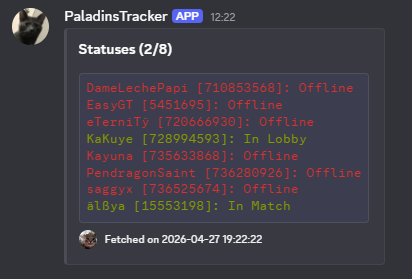
Now, while implementing current() by itself isn’t really that interesting, what is interesting — and honestly, new — is implementing a way to bulk-check the status of multiple players at once.
For players of this game, you’ve probably seen people spamming >>current [player] in some bot channel, checking a list of people they want to either snipe or dodge. Of course, if you’re interested in only one or two players, this isn’t an issue. But when there’s a long list? It becomes tedious having to slowly type out every single user’s username (or ID). It’s time consuming.
So, we decided to implement a way to handle this bulk fetching. First, we created a general “handler” that takes in a list, and then process it:
async def __statuses_handler(self, ctx, user_list):
lines = []
online = 0
for user in user_list:
try:
entries = await API.current(user)
for entry in entries:
username = entry["Username"]
status = entry["Status"]
id = entry["ID"]
if status == "Offline":
lines.append(f"[31m{username} [{id}]: {status}[0m")
else:
lines.append(f"[32m{username} [{id}]: {status}[0m")
online += 1
except PlayerNotFound:
lines.append(f"{user}: Doesn't Exist")
except PrivatePlayer:
lines.append(f"{user}: Privated Account")
description = "\n".join(lines)
description = f"```ansi\n{description}\n```"
embed = discord.Embed(title=f"Statuses ({online}/{len(user_list)})", description=description)
DiscordHelpers.set_embed_footer(embed)
await ctx.send(embed=embed)
returnFrom here, we can create as many commands and define the list of players we want them to return the status of. Of course, to protect the privacy of these commands, we took the liberty of placing them in a git submodule, just so they don’t appear in our repository.
Now, for example, one of our commands that uses this handler is cheaters(), which returns a list of cheaters to avoid:
Console Players
Now, we’ve implemented the core functionalities of our bot. However, there’s still one more thing to handle: one of the quirky things about the Hirez API is that it handles console players separately. For some reason, a username isn’t unique in Paladins; multiple console accounts can map to the same username.
What this means then is that getPlayer() can fail sometimes when searching by username; to find console players, we have to use getPlayerId(), which returns a list of IDs associated with a username, and we then have to iterate through them. With that in mind, when searching for usernames with multiple accounts, we create a dropdown menu to allow users to select which account to choose.
Another feature in Paladins is that console players can eventually “merge” their console and Steam accounts. However, during this merging process, the game creates a “dummy account” with no username. When naïvely returning someone’s friends list, it will include these dummy accounts for merged players; we have to filter out players with len(username) < 1.
Optimizations
For the remainder of this blog post, we’ll talk about some optimizations implemented to improve both our design and the runtime of our commands, enabling a better user experience.
Restructuring Database
Finally, we also re-evaluate our database schema. Up to this point, our SocialsDB was structured as follows:
- Username and ID fields: these are used to both associate the entry to a player, and also to make it easy when navigating the database manually.
- Deltas Lists: these are arrays containing dictionaries which told us the operation type, the target, and the timestamp.
- Socials Lists: these are dictionaries that map IDs to usernames in a user’s corresponding socials list.
Now, when looking at our SocialsDB, we notice that a document’s average size was around 3.5Kb. The size aside, we are storing a lot of redundant information: if multiple users are friends with the same user, we’d be storing duplicates of their username throughout our database.
Thus, we instead decided to add in a new collection PlayerIDs that acts as a single source of truth of ID-username mappings. Then, with this, we can refactor our code to instead store socials lists as simply arrays of IDs, and query the PlayerIDs collection to figure out the username.
After the restructuring, we noticed that the average entry size went from 3.5Kb down to 2.1Kb, giving us a 40% decrease in document size.
However, we note that while we’ve decreased document size and also introduced a single source of truth, a different issue popped up: in order to fetch a person’s username, we’d have to read from our database. For a socials list with hundreds of players, this means we’d have to do hundreds - maybe even thousands - of reads/writes to and from our database.
Needless to say, this would be costly. And as expected, after the restructuring, we went from around 3.153 seconds to 16.231 seconds for socials() on a player with a friends list of approximately 1000 players. This was disastrous for user experience! Our first attempt to reduce the increased runtime was to introduce indexing, though even then our commands took a long time to complete.
Thus, our journey to optimize performance begins.
Bulk Writes
Firstly, in our initial implementation, we were doing separate update() calls to our database every time a change was detected. Instead of this, we use MongoDB’s bulk_write(): we construct a list of operations we want to do, and then pass it into this function, allowing us to do multiple updates in a single request.
Caching I
The “Eureka!” moment was realizing that a cache would introduce a massive speed-up. Although bulk_write() helps when we have to update a lot of entries (due to usernames changing), it doesn’t solve the main issue: we are performing a lot of read operations.
To circumvent this, what we could do instead is to create a cache that stores the ID-to-username mappings. This allows us to not only avoid having to constantly read from our database, but also gives us an lookup time, greatly speeding things up.
However, with this restructuring, we have to be careful and ensure that we are not fetching old data: when a change is detected, we not only have to update our database, but also our cache so that users are getting live data. This change dropped our runtime for socials() down to 2.93 seconds.
API Migration
Now, while we experienced a massive slow-down after the restructuring (mainly for commands that required a lot of lookups), even before that our bot was very slow compared to other competing bots (PaladinsAssistant, Itto Bot, etc.). This was pretty bad; high latency is frustrating, running counter to a good user experience.
So, we had to investigate the cause(s) of this. As it turned out, part of this was due to the API wrapper we were using: Pyrez. While looking at the source code for other bots such as PaladinsAssistant, I noticed that they switched to a different API wrapper: aRez . The difference is that, unlike Pyrez, aRez is fully asynchronous and utilizes caching techniques to speed up its queries. Thus, it became apparent that a switch was in need.
This change proved to be very useful: for example, stats() initially took an average of 6.93 seconds over 30 iterations to complete using Pyrez. However, after switching to aRez, the runtime was reduced down to an average of 3.73 seconds, slightly slower than competing bots. But, this is expected - unlike other bots, we are querying for more detailed information (friends’ list, current online status, etc.).
To boost our performance even further, we implemented a get_socials() function for the aRez wrapper; by default, it provided an API call to fetch only friends, but we modified it to include friends, outgoing requests, and blocked players. This dropped our runtime down further, having it sit at only 2.38 seconds. This is nearing a 3x speedup.
Meanwhile, for functions that required a lot of databases reads (such as socials()), we ultimately saw a decrease from approximately 16.23 seconds down to 1.84 seconds after all the optimizations listed so far; this is over a 5x speedup!
Batching API Calls
Right now, we’ve already seen quite a good speedup, experiencing around a 3x speedup and 9x speedup for stats() and socials() respectively. However, we still run into issues with current() when we pass in a list of players, taking around 6 seconds for a list of 13 players - this makes sense, as each player needed an API call to fetch their status. And, for a while, there was no solution in sight.
However, going through aRez’s documentation, it turned out that we have the ability to “batch” requests: we can send a list of users at once to query using the Hirez API, and it automatically does it in one call. This was massive, and indeed it provided a good speed-up from 5.75 seconds down to 2.35 seconds; this is an over 2x speedup.
Caching II
Finally, we revisit the idea of caching once more, but this time to temporarily store player statistics. While using current(), users have the option to add the flag -d, allowing them to view detailed information (which, currently, is what queue the people of interest are in). Furthermore, for the future when we want to display information of every player currently in a live match, we are also fetching everybody’s statistics using getStats().
However, this means that we are making a disgustingly high number of API calls: a live match has 10 players, which means per-active-match in current(), when we are specifying the -d flag, we’d have to make 10 getStats() API call too. This is clearly costly.
And in fact, averaged over 20 iterations, we see that a call to current() with two active matches already takes around 28.34 seconds to complete. To solve this? We implement a cache once again.
The idea is that player statistics (such as winrate and KDA) won’t be fluctuating much due to a few matches after a certain point. For example, imagine you’ve already played 5000 matches. A single win or loss isn’t going to change your winrate at all; we’d need multiple matches to see a change. Similarly, if you’ve already died tens of thousands of times, a single kill won’t impact your KDA much.
So, with that in mind, we implement a cache with a time-to-live (TTL) based off of someone’s number of games played. The idea is that when we do an initial check of every player in a match, we cache it so that subsequent calls involving said player won’t have to recalculate the statistic. The more matches a player’s played, the longer the TTL is (going up to one hour). And, to prevent our cache from growing endlessly, expired entries are evicted.
With this optimization, we witness a drastic improve in our runtime, not only for current(), but also for stats() (which makes sense, as we no longer have to re-calculate statistics for a player). Namely, once we’ve cached players’ information, our runtime went from 28.34 seconds down to 6.19 seconds; this is almost a 5x speedup. Similarly, for stats(), our runtime dropped down to around 1.82 seconds once we’ve cached the information, with the majority hold-up being from necessary API calls; this is comparable to other bots despite us creating a much more detailed profile than them.
Summary
Overall, these optimizations have provided a massive speedup to our performance, greatly improving the user experience. Below, we summarize our journey in optimizing our implementation. First, we summarize our improvements for stats():
| Optimization | Time Elapsed (s) |
|---|---|
| None | 6.93 |
| aRez Migration | 3.73 |
| Cache I | 3.15 |
| Custom aRez Function | 2.38 |
| Cache II | 1.82 |
For socials() with a list of around 1000 players, we see that we have:
| Optimization | Time Elapsed (s) |
|---|---|
| None | 16.23 |
| Indexing + aRez I | 6.05 |
| Cache I | 2.93 |
| aRez II | 1.84 |
Finally, for current() with the -d flag and two live matches, we summarize the performance below:
| Optimization | Time Elapsed (s) |
|---|---|
| None | 30.82 |
| Batching | 28.34 |
| aRez II | 14.84 |
| Cache II | 6.19 |